
Yet Another Podcast returns with a great show with Mike Bluestein from  Xamarin, talking about Xamarin Past, Present and Future. Xamarin recently released Xamarin 3, and with it Xamarin Forms, greatly simplifying the process of creating cross platform applications.
Yet Another Podcast Show 126–Mike Bluestein from Xamarin


Xamarin Forms and HTTP
Let’s say we’re building an application, and we want to list the titles 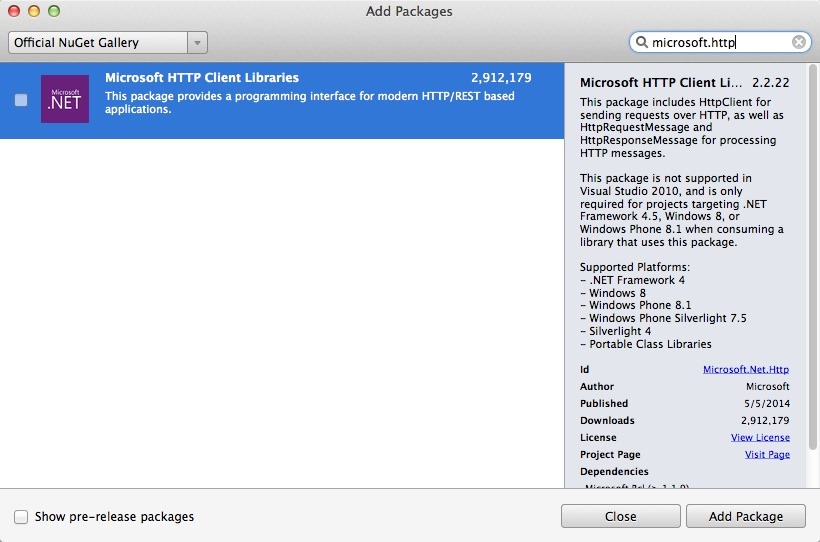 and publication dates from an RSS feed.
We can do this using a ListView, but we have to get the feed, and to do that we need a library; specifically the NuGet package Microsoft.Http.Client Libraries.
[Click on image for full size]
This is part of the on-going series of posts on Learning Xamarin; a complete index to the series can be found here.
To create our application we’ll start with a new Forms application by firing up Xamarin Studio and selecting New Solution -> C# -> Mobile Apps -> Blank App (Xamarin.Forms.Portable
Continued here
Posted in Xamarin
2 Comments
New Pluralsight Course: Testing AngularJS From Scratch
Incredibly pleased to announce the release of my latest Pluralsight  course: Testing AngularJS From Scratch
In this course, you will learn how to create software using Behavior Driven Development, a test-first, agile approach to creating Angular programs using Jasmine.
I will be presenting on this topic at both FalafelCon and at AngleBrackets.

Learning Xamarin: Tabbed Pages
Until now, our application has used simple “push” navigation, creating a  stack that the user can pop out of to return to the calling screen.
It would be convenient, however, to add tabs to the opening screen where the user can access the help file and the license information.
In the figure to the right, you can see that there are three tabs, and the currently selected tab is “help.”
To accomplish this, we’ll add three new pages:
- MainPage will hold the tabs
- HelpPage will hold the help text
- LicensePage will hold the license information
Continued here
Posted in Xamarin
2 Comments
Learning Xamarin–Adding Pages
The application that I began describing here (and which is part of this series) is almost  done.
done.
Today, we’ll add a new first page to allow the user to track more than one appliance type. This will require minor changes throughout the application and a change to the database.
The key concern would be that we already have data in the database and now I not only want to add a table, but I want to add a property to one of the existing (and populated!) tables.
Turns out that SQLite.net makes this a total non-issue, handling the update perfectly with no effort on my part.
Continued here
Posted in Xamarin
5 Comments
Album of the Week: Within Temptation’s The Silent Force
The only thing better than discovering new music that you love is to find it in your  own collection and realize that you’ve forgotten about it.
There is a special, if poignant joy in rediscovery.
Silent Force by Within Temptation is a wonderful, classic example of Symphonic Metal, and has track after track that is just terrific.
Their music is compelling, ethereal, driven and very beautiful. I’m very much looking forward to trying their other albums.
Learning Xamarin–Persistence with SQLite
Virtually every interesting application deals with data, and very often you want that data to survive your session with the app, so that you can return to it next time. 
To accomplish this, you must write your data somewhere, and with mobile apps you have a number of options. For small amounts of data you may well decide to write to the file system (yes, there is one!)
But for larger amounts of data, a database is very convenient, and happily SQLite comes preinstalled on iOS and Android.
Even better, nearly all the code you write for SQLite is shareable across platforms; the only platform-specific code is configuring the db connection and setting the location of the db file.
Continued here
Posted in Xamarin
Comments Off on Learning Xamarin–Persistence with SQLite
Learning Xamarin: Tinkering with the App
This is part of the on-going series of posts on Learning Xamarin; a complete index  to the series can be found here. In the previous installment, I modified the application that I began in this posting.
Today, I’m going to tinker a bit more, though the really big fix is to add persistence. That, I’m afraid, will wait a little while longer.
What I want to do today is to ensure that the criteria are the same across items (and turn them into labels rather than values that can be filled in). And I want to get rid of the pre-created data and make sure that my first item and first criterion work as expected.
To do this, I need to make a few modifications to the pages, but for this short posting, I’m not changing the basic structure of the program.
Continued here
Posted in Xamarin
Comments Off on Learning Xamarin: Tinkering with the App
Learning Xamarin–Extending the App
This is part of the on-going series of posts on Learning Xamarin;  a complete index to the series can be found here. In the previous installment, I modified the application that I began in this posting.
Today, we extend that application in a couple of ways. First, it really bothered me to have “Add criterion” on the items page; it seemed much more reasonable to have it on the Details (criteria) page, and so we’ll move it.
Second, currently we have no way of adding new items (e.g., a new Dishwasher) so we’ll add that ability.
The process of making these changes will make evident that once you get the pattern, adding pages and navigating among them is pretty straightforward.
Continued here
Posted in Xamarin
Comments Off on Learning Xamarin–Extending the App
Xamarin–Converting int to string
In yesterday’s posting, I complained that Forms do not (yet) automatically  convert strings to integers (or vice versa) and thus was “forced” to declare my integer values as strings. Today, I work around that problem by implementing an IValueConverter.
In yesterday’s code, for example, the Criterion’s Rating and Importance were declared as strings.
Today, we reset them to the semantically correct int,
Continued here
Posted in Xamarin
Comments Off on Xamarin–Converting int to string
Learning Xamarin: Building an App
I’ve set out on an adventure; not only to learn Xamarin inside out,  but to build an app, in public. I don’t know if I’ll finish it, I don’t know if it will work, and I don’t know just how much risk I’m taking blogging as I go, but life is risk.
The concept for the app came from my older daughter, Robin, who has recently accompanied us to buy both a new refrigerator and a new dishwasher (oh, the joys of home ownership).
Each time we went to Sears, and attempted to figure out what features were important to us, how important each feature was relative to the others, and how each potential choice stacked up with regard to those features. Then we’d run around trying to remember which item had the features we wanted most (think of price as a feature).
Robin’s idea was to create an app that lets you put in arbitrary criteria for any item you want to buy, weight the various criteria, and evaluate contending models based on those criteria.
My idea was to build this app incrementally, and worry about the aesthetics of the layout last, when I could go to our crack designer, Matt and plead for help. Continued here.
Posted in Xamarin
Comments Off on Learning Xamarin: Building an App
