
In a previous blog post I walked through a RAG example using Microsoft Agent Framework so that we could do a semantic search against our documents.
However, Bruno Capuano (Microsoft) and I went over this for my latest video with him. His reaction was that what I was doing was “right” but that I was working too hard, doing things that the Microsoft.Extensions.AI.Templates would do for me—or at least make simpler. He pointed me to the quickstart for AIChatSample.
The good news about this sample is that it is a complete, if simple, example of RAG with Microsoft Agent Framework. The bad news is that it isn’t really documented in the Quick Start, and the RAG elements can get lost in the ASP.NET bits.
This blog post will strip things down to their bare base.
We begin by bringing in the NuGet package we need
dotnet new install Microsoft.Extensions.AI.TemplatesThis allows us to bring in the Microsoft.Extensions.AI package, which is critical to making all this work. It was the absence of this package that forced me to do everything by hand.
Setting up
So, here are the steps after you load up the template:
Pick your LLM (I chose Ollama — well that’s a lie, I actually did it in llama, but that won’t change anything). Next, pick your development environment; for this I chose Visual Studio. Create a new project and configure it. For Vector store select Local On Disk to keep things simple — not for production!
The quick start points out three classes in the Program.cs file: IChatClient (to talk to the generative model), IEmbeddingGenerator (the service used to generate embeddings), and JsonVectorStore, which acts as an in-memory vector store. It also points you to where you put your PDF or .md (etc.) documents (wwwroot/Data folder).
Then the QuickStart falls off a cliff. It shows you where to register your two local models (in my case llama3.2 and all-minilm, the latter for embeddings). You then run and test the app. Hey! Presto!
Let’s look just a bit deeper. We’ll start in Program.cs. Here we set chatSettings and then chatClient (an IChatClient). Because I’m using a local model I don’t need an API Key but we do need an Endpoint. We also set the model (which, as noted, I used LlamaCpp) and make that an instance of IChatClient
var chatSettings = builder.Configuration.GetRequiredSection("LlamaCpp:Chat");
IChatClient chatClient = new OpenAIClient(
	new ApiKeyCredential(chatSettings["ApiKey"] ?? "not-needed"),
	new OpenAIClientOptions
	{
		Endpoint = new Uri(chatSettings["Endpoint"] ?? throw new InvalidOperationException("LlamaCpp:Chat:Endpoint is required."))
	})
	.GetChatClient(chatSettings["Model"] ?? throw new InvalidOperationException("LlamaCpp:Chat:Model is required."))
	.AsIChatClient();
Next, we set up the embedding, with pretty much the same pattern. We then do a bit of housekeeping, setting up the vectorStore Collection as a SqliteCollection. This uses an IngestedChunk, which is defined in this program but is what you would expect when creating a chunk (e.g., a name, a context string, etc.). One key thing in this object is the string VectorDistanceFunction, which is assigned the DistanceFunction.CosineDistance—so we know we’re going to be using semantic searches (as opposed, e.g., to keyword searches).
Ingestion
The place to start (not counting program.cs) is in Chat.razor. Here is the system prompt and the loading of the documents that will be what is retrieved in Retrieval Augmented Generation (I bet you were wondering what RAG stood for!).
Chat.razor calls IngestData in its LoadDocuments method. Ingest data does what it says. You’ll remember that we did a fair amount of work to ingest the data. It is a bit simpler here. We create a VectorStoreWriter, passing in the vector store and the dimensionCount. The IngestedChunk.VectorDimensions is initialized with the CollectionName, the DistanceFunction, and a boolean: IncrementalIngestion.
Next we declare an IngestionPipeline where we set the reader using an instance of the DocumentReader we’ll create passing in the directory where the files are, and an instance of SemanticSimilarityChunker (which is provided by Microsoft). Here we pass in the embeddingGenerator we created earlier, the writer, and a loggerFactory.
We’re ready to process all the files using another Microsoft-provided method. All we have to do is pass in the directory that holds the files and our search pattern. Boom! Our data is in its vector storage, just like that. Okay, it wasn’t simple, but it was simpler.
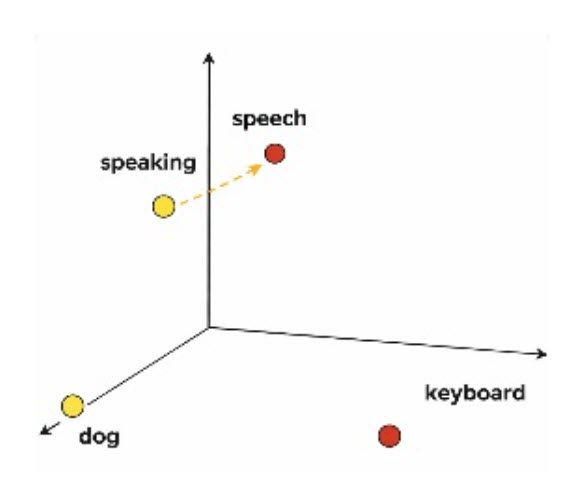
Want to get the right chunks out? SemanticSearch will, after making sure there are documents at all, set a variable to the result of calling the Microsoft-supplied Search method, which you pass the text to, along with the maxResults and the ingested chunk that comes from the razor page. Here, nearest means semantically nearest. Remember the diagram at the top of this post? We saw that diagram back in Deeper Into Rag (which might be worth a re-read).
There’s a good deal more to the program, but this was the heart of the RAG aspect.
My sense is that the library is, in fact, doing a fair amount of the work for you and is almost certainly the right way to go. I’m going to create a demo program by using this app as the skeleton. I’ll let you know how it goes.
Note: The initial draft of this post was written by BlogWriter and then
edited by Jesse Liberty. Illustrations by Copilot. Caution: LLMs make mistakes; this post is offered as is.

